- 2009年6月 7日 06:32
- Last update: May 23, 2021 17:25
- MTカスタマイズ | MTカスタムフィールド


Movable Typeのダッシュボードから最近の記事で使っているカスタムフィールドの内容を見ることができるようにウィジェットを作ってみました。
前にダッシュボードのウィジェットを作ったりしていたのですが(MT:ダッシュボードにブログパーツを表示させてみた)、その続きです。
まずはスクリーンショットを。
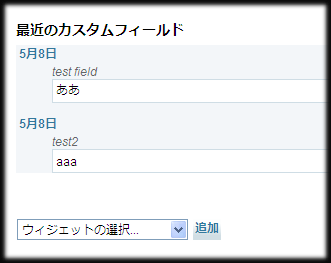
テンプレートファイルのソースはこのようなものです。
<mt:setvarblock name="html_head" prepend="1">
<link rel="stylesheet" href="<mt:var name="static_uri">plugins/c_field_widget/css/styles.css" type="text/css" media="screen" />
</mt:setvarblock>
<mt:setvartemplate name="showCustomField">
<MTEntries days="30" sort_by="modified_on" limit="5">
<div id="cf_entry-<$MTEntryID$>" class="entry-<mt:if name="__odd__">odd<mt:else>even</mt:if>">
<MTEntryCustomFields>
<MTIfNonEmpty tag="EntryCustomFieldValue">
<div class="entry-title cf_entryTitle"><MTEntryAuthorID setvar="entry_author_id"><MTSetVarBlock name="entry_title"><MTIfNonEmpty tag="MTEntryTitle"><$MTEntryTitle$><MTElse><__trans phrase="..."></MTIfNonEmpty></MTSetVarBlock>
<h4><MTIf name="editable"><a href="<mt:var name="script_url">?__mode=view&_type=<$MTEntryClass lower_case="1"$>&blog_id=<MTEntryBlogID>&id=<MTEntryID>"><$MTEntryTitle$></a><MTElse name="author_id" eq="$entry_author_id"><a href="<mt:var name="script_url">?__mode=view&_type=<$MTEntryClass lower_case="1"$>&blog_id=<MTEntryBlogID>&id=<MTEntryID>"><$MTEntryTitle$></a><MTElse><$MTEntryTitle$></MTIf></h4>
</div>
<div class="entry-meta cf_fieldName"><$MTEntryCustomFieldName$><mt:if tag="EntryCustomFieldDescription">(<$MTEntryCustomFieldDescription$>)</mt:if></div>
<div class="entry-content cf_fieldValue"><$MTEntryCustomFieldValue encode_html="1"$></div>
</MTIfNonEmpty>
</MTEntryCustomFields>
</div>
</MTEntries>
</mt:setvartemplate>
<mtapp:widget id="DashbordWidgetCalendar" class="widget" label="最近のカスタムフィールド" can_close="1">
<mt:getvar name="showCustomField">
</mtapp:widget>
直近の記事のカスタムフィールドの内容を全て出力します。EntryCustomFieldsのexcludeモディファイアを使えば、除外するフィールドを指定して、特定のフィールドだけ出すこともできます。
pluginとしてセットしたものをここに置いておきます。mt-staticフォルダにCSSファイルが入ってますが、気に入らなかったら使わないとか好きに書き換えするとよろしいかと。
- Download
- Newer: 買い物はいつものスーパーで
- Older: Open SearchプラグインにAjax 検索を
Comments:
コメントをどうぞ。書き込む場所が不明な場合やサイトオーナーへのコンタクトは、GuestBookまでお気軽にどうぞ
blog comments powered by Disqus