- 2013年5月 2日 12:33
- Last update: Sep 28, 2017 22:44
- myown


phpMyAdminの操作などのアイコン表示されている部分の表示方法のコンフィギュレーションについてのメモ
Coreserver.jp のデータベースの管理ページからphpMyAdminを自動インストールしたあと、アイコンと説明の文字が表示される状態になっていました
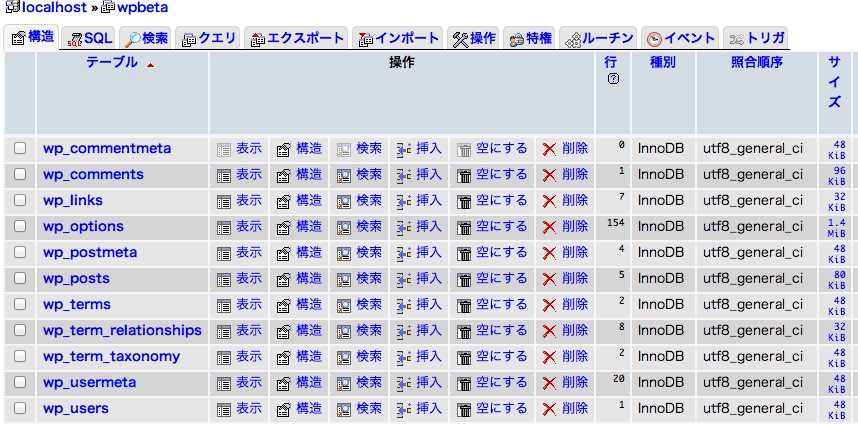
このままでもいいのですが、横にスペースをとるのでウィンドウサイズを広げないと横スクロールが発生して少し使いにくくなります。
これを下のようにしたい、というときの設定です。

まず、config.inc.php をエディタで開きます。
以下の設定を追記あるいは、変更します。
// Tabs display settings
$cfg['PropertiesIconic']      = TRUE;
コメントの部分を転載しますと、
// Use icons instead of text for the table display of a database (TRUE|FALSE|'both')
ドキュメント(Documentation.html#config [ phpmyadmin 配下にあるHTMLドキュメント ])より
$cfg['PropertiesIconic'] stringIf set to TRUE, will display icons instead of text for db and table properties links (like 'Browse', 'Select', 'Insert', ...).
Can be set to 'both' if you want icons AND text.
When set to FALSE, will only show text.
まとめますと
- TRUE アイコン表示
- FALSE テキストのみ
- both アイコン + テキスト
確認したヴァージョンは、3.5.1 、3.5.2。 以上です。
- Newer: Movable Type:メモ:Lorem ipsum について
- Older: 今月のいらんことしい(2013年 4月)
Comments:
コメントをどうぞ。書き込む場所が不明な場合やサイトオーナーへのコンタクトは、GuestBookまでお気軽にどうぞ
blog comments powered by Disqus